Time Tracking Software Comparison for Businesses
Explore our expert time tracking software comparison. We analyze top tools on features, pricing, and real-world use to help you find the best fit for your team.
When you're comparing time tracking software, the most important question to ask is what you really need it for. Is your goal just to log hours for payroll, or are you trying to build a system that manages project profitability and resources? The right tool for you hangs on that answer.
Why You Can't Afford to Guess About Time Anymore

In a world of remote teams and flexible schedules, knowing how time is spent isn't just a nice-to-have—it’s a business necessity. The old ways of manual timesheets and guesstimates just don't cut it anymore. Without a clear digital trail of where every hour goes, you're essentially flying blind. You can't accurately price projects, understand your team's capacity, or even know which clients are truly profitable.
This lack of clarity hits the bottom line, hard. Unbilled hours and administrative headaches slowly chip away at your margins, sometimes turning what looked like a winning project into a loss. The scale of this problem is massive; globally, companies lose an estimated USD 7.4 billion a day simply because work time goes untracked. That staggering number makes it clear that a solid digital solution isn't just an option. If you want to dig deeper, you can discover more insights about time tracking market growth on marketresearchfuture.com.
It’s Not About Logging Hours—It’s About Managing Resources
The best time tracking tools have moved way beyond a simple start-and-stop timer. They act as the nerve center for your entire operation, giving you a clear view of your team's efficiency. When you connect time entries to specific tasks, projects, and clients, you unlock insights that drive smarter business decisions.
Here’s what that looks like in practice:
- Keep Projects Profitable: You can see in real-time if a project is going over budget or if scope creep is killing your profits.
- Work Smarter, Not Harder: Easily spot bottlenecks in your workflow and shift resources around to keep things moving.
- Invoice and Pay with Confidence: No more guesswork. You can generate accurate invoices for clients and ensure your team is paid correctly for their work.
- Forecast Like a Pro: Use real data from past projects to create better, more accurate estimates for new ones, which builds a ton of trust with clients.
The real value of a time tracking tool isn't just about counting minutes; it's about making every minute count. It transforms time from an abstract concept into a measurable asset that directly influences financial health.
To help you find the right tool for your team, we're breaking down some of the top options based on what actually matters day-to-day.
Core Criteria for This Comparison
We're looking at each software from a practical standpoint, focusing on usability, essential features, and the real value it delivers.
| Evaluation Criteria | Why It Matters for Your Business |
|---|---|
| Usability & Adoption | A tool is useless if your team won't use it. We're looking at how easy it is to set up and use every day. |
| Integrations | It has to play nice with the tools you already use, like your project management and accounting software. |
| Reporting & Analytics | We'll check the quality of insights—from basic timesheets to deep-dive reports on project profitability. |
| Pricing & Scalability | The price has to make sense for the value it provides, and it needs to be able to grow with you. |
A Quick Look at the Top Time Tracking Tools
Before we get into a detailed, feature-by-feature breakdown, let's start with a bird's-eye view of the major players. Every tool out there has its own philosophy, built for different kinds of teams, workflows, and budgets. This quick introduction will help you get your bearings on who’s who.
Think of it this way: some tools are stripped-down and simple, perfect for a freelancer who just needs to log hours for an invoice. Others are massive, all-in-one platforms built for large companies needing deep analytics and workforce management. Knowing which camp a tool falls into from the start will save you a ton of time down the road.
High-Level Contender Profiles
First on the list is Connecteam, a tool designed from the ground up for businesses with employees who aren't chained to a desk. Its real power comes from bundling time tracking with scheduling and team communication into a single mobile app. For any team working in the field, its GPS and real-time tracking are game-changers for accountability.
Then you have Rippling, which isn't just a time tracker—it's a full-blown platform for HR, IT, and finance. Here, time tracking is just one piece of a much larger puzzle. The main draw is its ability to automate everything from overtime pay to payroll, making it a fantastic choice for companies wanting a single source of truth for all employee data.
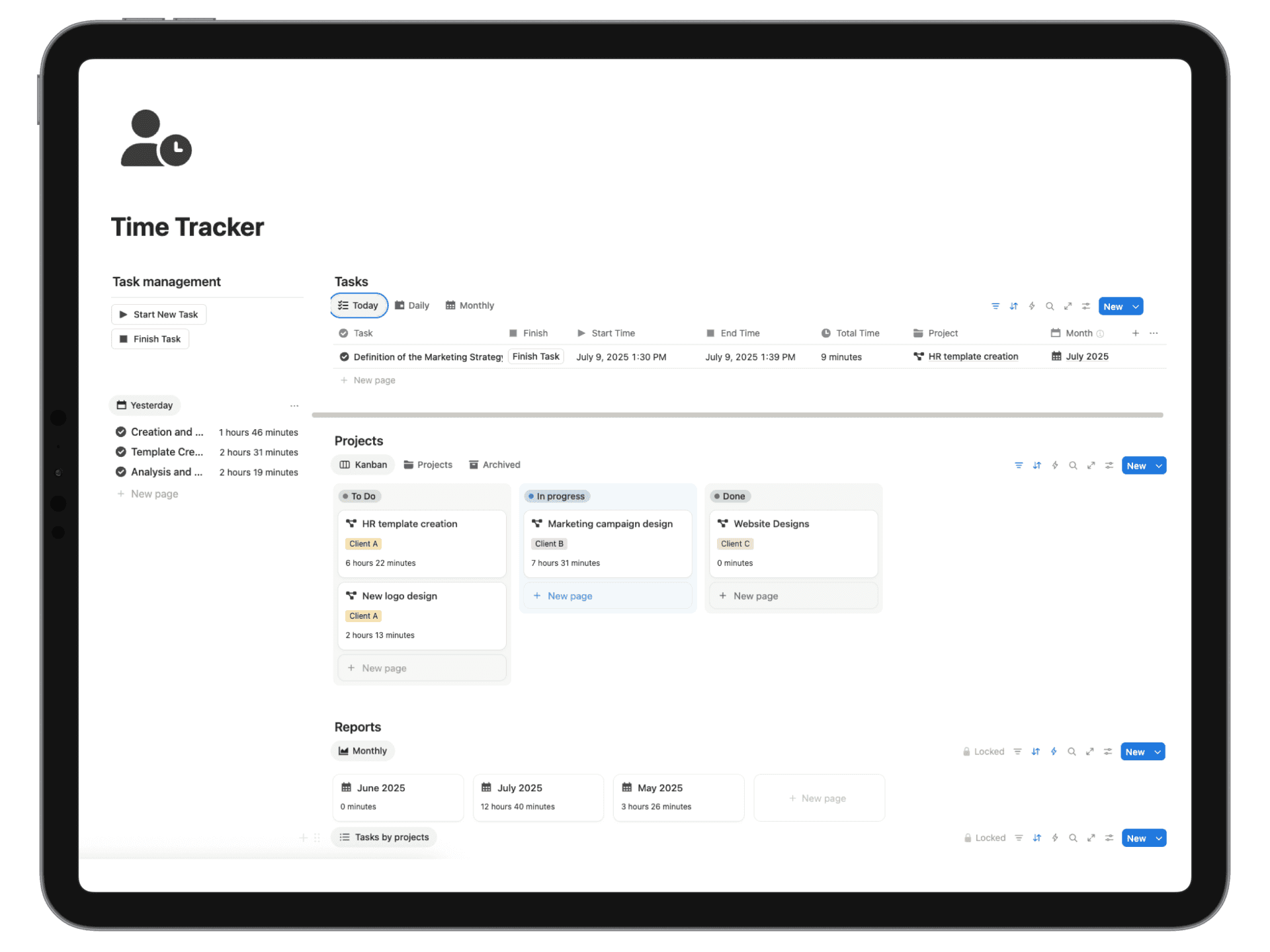
Flowtion’s Time Tracker Pro takes a completely different path. It's built to live entirely inside Notion, making it a no-brainer for the freelancers, consultants, and agencies who already run their businesses there. Its biggest win is how it weaves time tracking directly into project management, so you never have to leave the app you're already working in.
The best time tracker isn’t the one with the most bells and whistles. It’s the one that fits so neatly into your daily routine that you actually use it. A clunky, separate system almost always leads to spotty adoption and bad data.
Finally, there’s Zoho People, a component of the vast Zoho software universe. If your business is already running on other Zoho apps, this is a natural fit. It provides a solid, affordable HR suite where time tracking, attendance, and leave management all work together seamlessly.
Leading Time Tracking Software at a Glance
To make things even clearer, here’s a high-level summary. Think of this table as a cheat sheet to quickly see which tools might be right for your team.
| Software | Ideal User | Core Strength | Starting Price |
|---|---|---|---|
| Connecteam | Mobile Workforce & SMBs | All-in-one communication and tracking app | Free for up to 10 users |
| Rippling | Mid-Sized to Large Businesses | Unified HR, IT, and finance platform | Starts at $8 per user/month |
| Flowtion's Time Tracker Pro | Freelancers, Consultants, & Agencies | Seamless integration within Notion | One-time purchase |
| Zoho People | SMBs using the Zoho ecosystem | Integrated HR and attendance suite | Starts at $1.05 per user/month |
This quick look should give you a good starting point for the deeper dive ahead. For professionals who live and die by the billable hour—like consultants—choosing the right tool is absolutely critical. For a more tailored list, you can check out this guide on the best time tracking software for consultants.
Now, let's roll up our sleeves and start comparing the nitty-gritty features.
Diving Into the Critical Time Tracking Features
When you're picking time tracking software, it all comes down to how well it solves your day-to-day problems. A beautiful dashboard means nothing if logging your hours is a pain. And what good are advanced analytics if you can't get that data into your invoicing tool? This is exactly why we need to go deeper than a simple feature checklist.
Let's get past the marketing fluff and look at how these tools actually perform in the real world. We'll examine five core functions: automated time entry, project tracking, invoicing, reporting, and team management. By looking at them through the lens of practical, everyday scenarios, you'll get a much clearer picture of which tool is the right fit for your workflow.
Automated Time Entry: How It Really Works
Let's be honest: manual time entry is the biggest roadblock to getting accurate data. When your team has to constantly remember to start and stop timers for every little thing, mistakes are going to happen. It's just human nature. Modern tools try to solve this with automation, but they all go about it in very different ways.
Some platforms, like Rippling, get pretty sophisticated with features like geofencing and app-based tracking. Imagine an employee showing up to a job site and being clocked in automatically, or having their time logged based on which application they’re using. This is a game-changer for businesses where location or specific software usage is key.
Other tools take a different approach, focusing more on workflow integration. Flowtion’s Time Tracker Pro, for example, is built to live inside your Notion workspace. The automation here isn't about watching what you do; it's about eliminating friction. You start the timer on the exact same screen where you're managing the task. It becomes a natural part of the process, not a separate chore you have to remember.
The real goal of automation isn't just about saving a few clicks. It's about making time tracking so seamless that it becomes second nature. The best system is always the one your team doesn't have to think about.
This push for smarter technology is driving huge growth in the time tracking market. For large companies trying to manage thousands of employee hours, these automated features slash administrative waste. In fact, productivity gains have been shown to halve organizational error rates and help reward efficient employees—clear operational wins. If you want to dig into the numbers, you can read the full research on the time tracking software market.
Project and Task Tracking: Granularity Matters
Good time tracking isn't just about counting hours; it's about connecting those hours to meaningful work. The level of detail you can get with project and task tracking is often what separates a basic timer from a truly valuable business tool. A simple app might let you assign time to a project, but a great one lets you drill down into specific tasks, sub-tasks, and even client deliverables.
Think about a marketing agency juggling five clients, each with several campaigns running at once.
- Basic Tracking: A simple timer app might only let them log hours against "Client A Project." That gives you almost no real insight.
- Advanced Tracking: A more powerful system lets them create a clear hierarchy, like Client A > Q3 Social Media Campaign > Task: Design Ad Creatives. This is the kind of detail you need to actually analyze profitability.
This is where Flowtion’s Time Tracker Pro really shines for teams already using Notion. It plugs directly into Notion's database structure, so you can link time entries to the projects and tasks you've already built. Your time data lives right alongside your project briefs and deadlines, giving you the full picture without ever leaving the app.
On the other hand, a tool like Connecteam is built for mobile workforces. Its task tracking revolves around jobs and shifts, not granular office tasks. It’s perfect for a construction crew logging time against "Site A - Framing," but not so great for a developer breaking down a feature into a dozen sub-tasks. The "best" tool really depends on the kind of work you do.
Invoicing and Billing: The Final Connection
Tracking your time is just step one. Getting paid is the real goal. The link between your time tracker and your invoicing software can either make your life easy or create a monthly administrative nightmare. A smooth integration can literally save you hours of work.
Many platforms, including Zoho People and Rippling, offer direct connections to accounting software like QuickBooks or Xero. This lets you turn approved timesheets into invoices with just a couple of clicks, automatically pulling in billable hours and project details. For businesses with a standard billing process, this is a massive time-saver.
But freelancers and consultants often have different needs. They might want to show a client a clean, detailed report of their time before sending an invoice. This is where a system like Flowtion’s Time Tracker Pro offers a unique advantage. Since your data is in a flexible Notion database, you can create custom, shareable views for each client. You can show them exactly what you did and when, building transparency and trust before the bill even goes out.
Here’s a quick breakdown of the different approaches:
| Integration Style | Best For | Example Scenario |
|---|---|---|
| Direct API Integration | Businesses using standard accounting software (e.g., QuickBooks). | An agency auto-generating draft invoices from weekly timesheets for ten different clients. |
| Flexible Data Export | Freelancers needing custom reports before billing. | A consultant creating a client-facing Notion page showing only the hours for a specific project milestone. |
| All-in-One Platform | Companies wanting one system for HR, payroll, and time. | A large company using Rippling to have hours flow seamlessly into payroll and benefits calculations. |
Reporting and Analytics: Turning Data into Decisions
A good time tracker doesn’t just collect data—it helps you make sense of it. The quality of a tool's reporting is what elevates it from a simple stopwatch to a powerful business intelligence platform. The trick is finding a system that gives you the insights you need without burying you in useless metrics.
For big organizations, a platform like ADP or Rippling offers enterprise-level analytics. Managers can build custom dashboards to watch team capacity, compare budget vs. actuals, and spot long-term productivity trends. These tools are built to handle complexity and deliver high-level summaries for executives.
Smaller teams, agencies, and freelancers usually need answers to more immediate questions:
- Which of our projects are actually profitable?
- Are we quoting our services correctly?
- How much time are we sinking into non-billable admin work?
This is where an integrated tool like Flowtion’s Time Tracker Pro really comes into its own. By using Notion’s native sorting, filtering, and formulas, you can create your own live reports right from your time data. You can build a dashboard showing profit-per-client or a chart tracking billable vs. non-billable hours this month—no separate analytics tool required.
Team Management and Permissions
As your team gets bigger, you need to control who can see and do what. A freelancer working alone doesn't need to worry about this, but an agency with ten employees and a handful of contractors needs tight, granular controls.
Most dedicated time tracking platforms offer role-based permissions. This means you can set up different user types, such as:
- Administrator: Full access to everything—data, settings, and billing.
- Project Manager: Can see time entries and reports for their assigned projects.
- Team Member: Can only track and edit their own time.
This kind of structure is vital for keeping data private and operations secure. Systems like Zoho People and Connecteam offer robust controls that are perfect for a structured business. For a small agency or a group of freelancers using Notion, management is a bit more fluid. Permissions are handled by Notion itself, giving you a more flexible, collaborative way to manage who sees what.
Finding the Right Software for Your Business
A list of features tells you what a tool can do on paper, but it doesn't tell you if it’s the right fit for your business. The best way to compare time tracking software is to look past the marketing bullet points and focus on how it works in the real world. A freelancer's day-to-day is completely different from a large corporation's, and your software should reflect that.
Choosing the right platform isn't about getting the most features; it's about finding the right ones that fit naturally into how your team already operates. Let's look at a few common business types and see which tools make the most sense for each.
Time Tracking for Freelancers and Solopreneurs
When you're a solo professional, time is literally money. Every minute matters, and the ability to clearly separate billable work from admin tasks can make or break your profitability. What you need most is simplicity, reliability, and a dead-simple way to get from tracked hours to a paid invoice. You don't need complicated team management tools or enterprise-grade security protocols—that's just clutter.
The perfect tool for a freelancer is lightweight and lives where the work gets done. This is exactly where Flowtion’s Time Tracker Pro shines. Because it’s built to work inside Notion, it becomes a seamless part of your existing project management dashboard. You can start a timer, log hours against a specific task, and pull a clean report for your client without ever leaving the page. For a solopreneur trying to stay focused on what actually pays the bills, that kind of friction-free workflow is a game-changer.
For a freelancer, the best time tracker is the one you barely notice. It shouldn’t feel like another admin chore, but a silent partner that helps you get paid faster and more accurately.
Solutions for Creative Agencies
Creative and marketing agencies live and die by their projects. They’re constantly juggling multiple clients, campaigns, and team members, all at the same time. Their biggest challenge is keeping a close eye on project profitability and team capacity. They have to know instantly if a fixed-bid project is about to go over budget or if a key designer is completely swamped.
This calls for a more robust system that can handle complex project structures—tracking time against clients, then projects, then individual tasks. While dedicated platforms like Rippling offer powerful analytics, the sheer flexibility of Flowtion's Time Tracker Pro inside Notion makes it a powerful contender. Agencies can design custom dashboards to see everything at a glance:
- Project Health: Instantly compare estimated hours against actual time spent for every client campaign.
- Team Workload: See a clear breakdown of who is working on what, making it easy to rebalance tasks and prevent burnout.
- Profitability Analysis: Calculate the effective hourly rate on each project to make smarter quotes in the future.
Agencies often have to send detailed time reports to clients to justify their invoices, so a system that makes this easy is invaluable. If you're looking to really nail this process, our guide on how to track billable hours breaks it down step-by-step.
Enterprise-Level Workforce Management
When you’re talking about a company with hundreds or thousands of employees, the whole game changes. Time tracking is no longer just about project management; it's about compliance, security, payroll, and high-level workforce analytics. The software has to manage complex overtime rules, adhere to labor laws, and use role-based permissions to keep sensitive data secure.
This is the world where platforms like Rippling and ADP are the undisputed champs. These aren't just time trackers; they're all-in-one HR platforms. Time and attendance data flows directly into payroll, benefits, and compliance reports. Their power lies in automating incredibly complex payroll calculations and ensuring the company stays compliant with labor laws across different states or countries. For a large enterprise, that kind of integration and peace of mind is absolutely non-negotiable.
Tools for Remote-First Companies
Remote teams need tools that build accountability and transparency without making people feel like they're being watched. The goal is to track progress on work, not to monitor keystrokes. This means the software has to be accessible from anywhere and plug into the digital tools teams are already using every day.
While mobile-first options like Connecteam are fantastic for teams out in the field, remote knowledge workers get the most value from systems tied directly to their project hub. A tool like Flowtion’s Time Tracker Pro, for example, lets a distributed team log hours against shared Notion databases. This gives managers a real-time view of how projects are progressing without having to schedule another check-in meeting. It fosters a culture of trust where time tracking is a tool for clarity, not control.
How to Choose the Right Time Tracking Software
Choosing the right time tracking software isn't about finding the tool with the longest feature list. It's about finding the one that actually solves your team's specific problems. A platform that's perfect for a massive enterprise will just create headaches for a freelancer, and vice-versa. The goal is to find a solution that slides so seamlessly into your workflow that your team actually wants to use it.
To get there, you need a solid decision-making framework. This means looking past the sticker price and flashy features to understand how a tool will truly impact your team's productivity, project profitability, and day-to-day efficiency. It all starts with getting honest about what you really need.
Define Your Core Requirements
Before you even start browsing software websites, sit down and map out exactly what you need this tool to do. Are you mostly trying to generate accurate invoices for clients, or do you need a deep dive into project budgets and team capacity? This one question will guide your entire search.
- For billing: Zero in on tools with robust invoicing integrations or flexible reporting that makes it easy to show clients a clean, detailed breakdown of your work.
- For project management: You'll want software that lets you track time against granular tasks and sub-tasks, giving you a clear picture of where every minute is going.
- For team productivity: Look for tools that highlight billable vs. non-billable hours. This helps you spot inefficiencies and find opportunities to optimize how your team spends its time.
This decision tree gives you a great visual for how different business needs should shape your priorities.
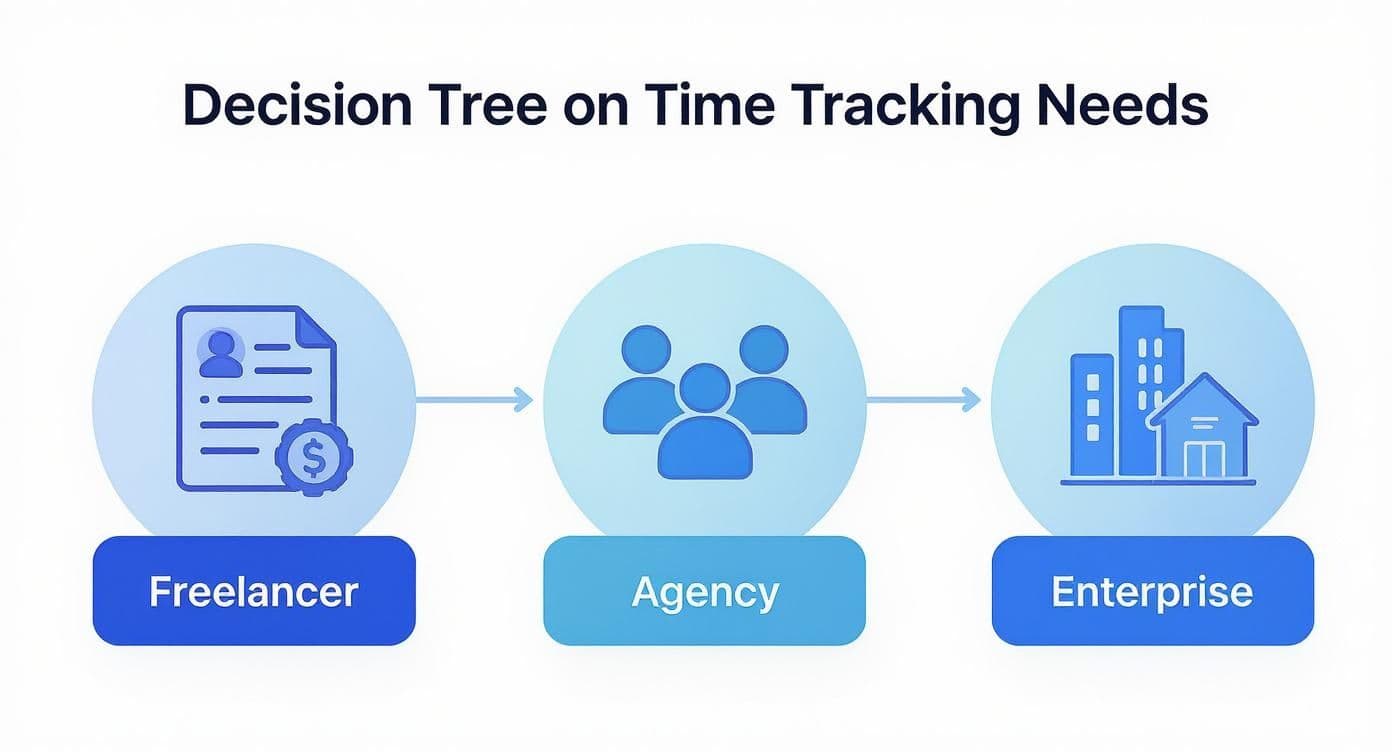
As you can see, a freelancer’s intense focus on invoicing is a world away from an enterprise's need for workforce management. Knowing where you fit on this map is key to finding the right solution.
Assess Scalability and Total Cost
The monthly subscription fee is just the beginning. You have to consider the total cost of ownership, which includes the time it takes to get it running, employee training, and what happens to the price as your team grows. A tool that seems like a bargain today can get surprisingly expensive once you add more users or need to unlock advanced features.
Think about where your business is headed. If you plan on hiring or taking on bigger projects in the next year, make sure you choose a tool that can grow with you. The last thing you want is to be forced into a painful software migration right when things are getting busy.
The global time tracking software market is booming, largely thanks to the rise of remote work. It's no surprise that project management is the top use case, and cloud-based systems are the go-to choice over on-premise solutions because they're accessible anywhere. This trend reinforces the need for a flexible, cloud-first tool. If you want to dig into the major players, you can read a detailed market analysis from Factmr.com.
Prioritize a Seamless User Experience
The most powerful feature a time tracking tool can have is simplicity. If logging time is a chore, your team will find ways to avoid it, leading to inaccurate data that undermines the entire purpose of the software.
When you’re evaluating options, pay close attention to the user interface. Is it intuitive? Can a new hire figure it out without a two-hour training session? For many teams, the best tool is the one that lives where they already work. For instance, our Notion Time Tracking Template integrates directly into existing project dashboards, so there’s no need to constantly switch between apps.
Use Trial Periods to Test Real-World Scenarios
Nearly every software provider offers a free trial or a demo—use it for all it's worth. Don't just poke around the feature list. Run a real mini-project through the system from start to finish.
- Get two or three team members to track their time on an actual task for a full week.
- Try to generate a client-ready report or an internal summary of project profitability.
- Test the integration with one of your essential tools, like your accounting platform or project management board.
This kind of hands-on testing is the only way to uncover the friction points and limitations that the marketing page won't tell you about. It’s the single best way to ensure the tool you pick will provide long-term value and get adopted by your whole team.
Got Questions About Time Tracking? We've Got Answers.
Picking the right time tracking tool isn't just about comparing feature lists. It's normal to have some real-world questions pop up, especially around sensitive topics like employee privacy or what the actual financial return will be. Let's tackle some of the most common concerns head-on so you can make a decision you feel good about.
Think of this as the final gut-check before you commit. We're addressing the practical hurdles you'll face, making sure you choose a tool that genuinely supports a healthy, productive team.
How Can We Track Time Without Being Creepy?
This is, without a doubt, the most important question on the table. The entire point of time tracking is to get a clearer picture of your operations, not to make your team feel like they're under a microscope. The secret lies in choosing software that builds transparency and focuses on work, not on surveillance tactics like keystroke logging or random screen captures.
A better way to approach it involves:
- Leading with Trust: Position time tracking as a tool for accurate project bidding and fair client billing, not as a way to "watch" people.
- Picking Non-Invasive Tools: Go for software that uses simple start/stop timers or connects directly to project tasks. Avoid anything that runs silently in the background.
- Talking It Out: Be completely open with your team about why you’re tracking time and how the data will be used. When people understand it’s to help with planning and prevent burnout, they’re much more likely to get on board.
Time tracking should feel like a tool for clarity, not a mechanism for control. When implemented with trust, it empowers teams by showing where effort is going and helps managers protect them from being overworked.
Will This Actually Work With Our Other Tools?
No tool is an island. A new time tracker has to play nicely with the software your team already lives in—your project management, accounting, and communication apps. If you introduce a clunky process that forces everyone to constantly switch tabs or manually copy-paste data, they'll drop it in a week.
When you're looking at different options, check for direct integrations with the software you use every day. A tool like Flowtion's Time Tracker Pro, for instance, is built to live right inside Notion, so for teams already on that platform, there's no integration needed. For others, you'll want to see native connections to tools like Asana, Jira, QuickBooks, or Slack. A smooth connection makes time tracking feel like a natural part of the job, not another chore to remember.
How Do We Figure Out the Real ROI?
The return on your investment in time tracking software goes way beyond just catching a few unbilled hours. Yes, recovering lost revenue is a huge plus, but the real gold is the operational intelligence you gain.
To see the full picture, look at these key areas:
- Smarter Project Bids: Compare your initial estimates to the actual time tracked. You'll quickly see which types of projects are your most profitable, allowing you to fine-tune your pricing and focus on the right kind of work.
- Unclogging Bottlenecks: Use the data to spot where things are getting stuck. If a specific phase of a project always goes over budget, you can dig in and fix the root cause.
- Better Team Management: Accurate data on who's doing what helps you spread the work around more evenly. This prevents burnout and makes sure you have the right people assigned to the right tasks from the start.
Ultimately, the ROI is measured in smarter decisions. When you know exactly where your team's time is going, you can guide your business toward more profitable, sustainable growth.
Ready to gain complete clarity on your projects and profitability? The Flowtion Time Tracker Pro template for Notion provides a seamless, integrated solution that your team will actually use. Get instant access and start making smarter decisions today. Learn more at theflowtion.com.