Best Time Tracking Apps for Freelancers
Discover the best time tracking apps for freelancers and learn how to choose a tool that streamlines billing and improves profitability.
The best time tracking apps for freelancers are much more than a simple stopwatch. They’re your secret weapon for understanding profitability, billing clients with confidence, and making your entire workflow smarter. Tools like Toggl, Clockify, and Harvest are popular for a reason—they turn the chore of logging hours into a powerful business strategy, showing you exactly where every minute goes.
Why Time Tracking Is a Freelancer's Secret Weapon

If you’ve ever felt like you’re juggling a dozen projects, constantly busy, but still wondering where the money went at the end of the month, you’re not alone. It’s a classic freelancer story: you’re pretty sure you under-billed someone, but you can’t prove it.
The key is to stop thinking of time tracking as a chore. It’s not just about filling out a timesheet for an invoice; it’s about gaining total clarity over your business.
Unlocking Profitability and Focus
Think of your billable time like inventory on a shelf. If you don't track it, you're essentially giving it away without knowing its value. A good time tracking app is your inventory manager, showing you exactly how much "stock" each client or project is taking up.
Suddenly, you have the data to make smarter decisions. You can:
- Spot Hidden Time Sinks: Finally see which clients send too many "quick" emails or how much time you really spend on non-billable admin.
- Price Your Services with Confidence: No more guessing. You can look back at similar projects, see exactly how long they took, and quote your next one perfectly.
- Boost Your Bottom Line: By capturing every billable minute, you plug the leaks in your revenue. In fact, many freelancers report 20-30% profit improvements after getting serious about tracking their time. The global market for these tools even hit USD 2.21 billion, a testament to their impact. You can read more about market trends over at Dataintelo.
This is what a typical time tracking dashboard looks like—a simple click starts the clock on a specific client or task.
This clean interface makes it easy to jump between projects while making sure every second is logged where it belongs.
Building Client Trust Through Transparency
Beyond the financial wins, time tracking is a massive trust-builder. When you send an invoice with a detailed, data-backed report, you’re not just asking for money—you’re proving your value. It replaces vague estimates with undeniable proof of work.
For a freelancer, transparent billing is not just good practice—it's a competitive advantage. It shows clients you value their investment and are committed to delivering measurable results.
Ultimately, mastering your time is about taking back control. It lets you create accurate invoices, protect your work-life balance, and run your freelance business with the confidence of a seasoned CEO. If you're ready to dig into the practical side, our guide on how to track billable hours is a great next step.
Essential Features of a Great Freelance Time Tracker
Shopping for a time tracking app can feel a bit like walking down the cereal aisle—dozens of options, all promising to make your life better. But a simple digital stopwatch is worlds apart from a tool that can actually help you run your freelance business.
Think of it like this: a basic calculator can add up numbers, but a financial advisor helps you understand what those numbers mean for your future. The best time trackers act like that advisor. They offer powerful features that reveal deep insights, save you from soul-crushing admin work, and genuinely help you grow.
Let's unpack the must-have features that separate the basic timers from the true business partners.
Automatic Time Tracking and Manual Entry
The heart of any good tracker is how it captures your time. As a freelancer, your day is anything but linear. You might jump from a planned project to an urgent client call, then dive into an unexpected bug fix. It’s incredibly easy to forget to hit "start" or "stop" on a timer, and those forgotten minutes are lost billable hours.
Automatic time tracking is your safety net here. It runs quietly in the background, logging the apps and documents you're using. At the end of the day, you can review this timeline and assign the time to the right projects. No more lost minutes. At the same time, manual entry is just as vital for logging offline work like client meetings or brainstorming sessions. A great tool has to offer both.
Project and Task Tagging
Logging eight hours as "Work for Client X" is practically useless. To really understand if a project is profitable, you need to know exactly where that time is going. This is where tagging comes in.
By tagging your time entries with specific projects (e.g., "Website Redesign") and tasks (e.g., "Wireframing," "Copywriting," "Client Revisions"), you create a detailed map of your workday. This data is the foundation for everything else.
This level of detail shows you if you’re constantly underbidding on certain tasks, which allows you to build much more accurate quotes down the line.
Robust Reporting and Analytics
Raw data is just noise. The real magic happens when your time tracker turns that data into reports you can actually use to make smarter business decisions. A top-tier app should be able to answer critical questions at a glance.
- Profitability Reports: Which clients or projects bring in the most money for the hours you put in?
- Time Allocation: How much of your week is spent on billable work versus non-billable admin?
- Task Breakdowns: Where are the bottlenecks? Are "quick revisions" secretly eating up half your day?
Without these analytics, you're just guessing. With them, you can confidently fire problem clients, double down on what works, and make your business more efficient.
Seamless Invoicing and Billing
Let's be honest: the whole point of tracking billable hours is to get paid. A tool that connects your time tracking directly to your invoicing closes the loop between doing the work and earning the revenue.
Look for an app that lets you generate a professional invoice from your tracked hours in just a few clicks. This completely eliminates the tedious and error-prone process of copying numbers from a spreadsheet into an invoice template. Some even connect to payment processors like Stripe or PayPal, making the entire cycle painless for everyone.
Many popular time tracking apps are built around this exact workflow. For example, Toggl Track offers a free plan for up to 5 users and its starter plan costs $9 per user per month, which unlocks features like automatic tracking and over 100 integrations with tools you already use, like Trello, Slack, and Asana. You can find more data on the time tracking market on dataintelo.com.
Mobile App and Multi-Platform Sync
Work doesn't just happen at your desk. You might need to track a client call while you’re running errands, log an expense from a coffee shop, or just check on a project’s budget from your phone.
A reliable mobile app isn’t a nice-to-have; it's a necessity. It should sync instantly with the desktop or web version of the tool, ensuring your data is always accurate and up-to-date, no matter where you are. This flexibility is key to capturing every single billable moment.
4 Types of Time Tracking Tools: Finding Your Perfect Match
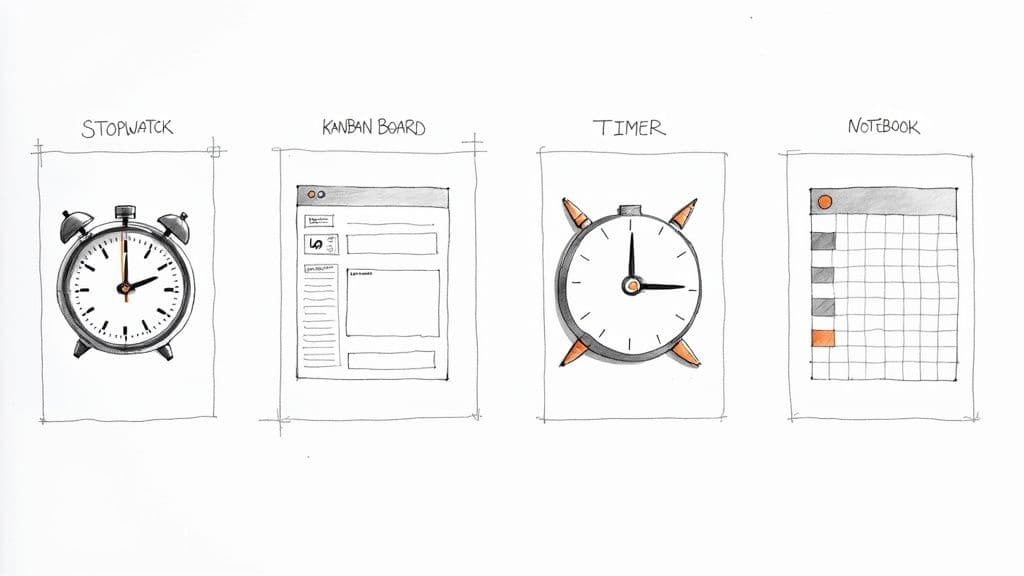
The hunt for the "best" time tracking app can feel like a wild goose chase. The secret isn't finding some universally perfect tool—it's about finding the one that clicks with your specific workflow. What an agency juggling dozens of clients needs is complete overkill for a solo writer.
To cut through the noise, let's look at the four main categories of tools out there. Understanding these archetypes will help you figure out what style fits you best before you get lost in a sea of brand names and feature lists.
1. Dedicated Time Tracking Powerhouses
Think of these as the Swiss Army knives of time tracking. Tools like Toggl Track and Clockify are built for one purpose: tracking time with absolute precision and turning that raw data into powerful business insights.
These apps are perfect for freelancers who:
- Juggle multiple clients and complex projects all at once.
- Need to generate detailed, client-ready reports to justify every invoice.
- Want to dig deep into profitability, analyzing it project-by-project or even task-by-task.
Their biggest strength is their intense focus. You get incredibly granular control, from setting different billable rates to breaking down tasks into tiny sub-tasks. The only real trade-off is that it’s yet another tool in your stack, separate from where you might be managing the actual work.
2. All-in-One Project Management Platforms
Next up are the do-it-all platforms like Asana, Trello, or ClickUp. Here, time tracking isn't the main event; it's just one feature baked into a much larger system for managing tasks, deadlines, and team collaboration.
Choosing an all-in-one platform means you’re prioritizing a single source of truth for your work. Your time logs live right alongside the tasks they belong to, giving you a complete, unified picture of every project.
This approach is a dream for freelancers who already live and breathe inside a project management tool and want to keep everything under one roof. The convenience is unbeatable—no more app-switching. The catch? The time tracking features are often simpler and less robust than what dedicated apps offer, especially when it comes to reporting and analytics.
3. Minimalist Timers and Browser Extensions
This category is for the purist—the freelancer who just wants a simple, no-frills stopwatch. These tools are incredibly lightweight, often living as a quiet browser extension or a small desktop app. They do one thing and do it exceptionally well: start and stop a timer.
These are a fantastic choice for freelancers who:
- Need to log hours quickly without a complicated setup.
- Typically focus on one project at a time.
- Don't need their tracker to handle invoicing or create fancy reports.
The main draw here is simplicity. It's fast, easy, and stays out of your way. Of course, the trade-off is a lack of advanced features. You won't get profitability reports or billing integrations, but you also won't be distracted by them. For a more complete financial picture, many freelancers pair these simple timers with some of the best business expense tracking apps to manage the other side of their books.
4. Manual Systems With Spreadsheets or Notion
Finally, we have the DIY approach. Building your own system with a spreadsheet in Google Sheets or a custom database in a tool like Notion gives you absolute, total control. You build it from the ground up to fit your process like a glove.
This is the path for freelancers who love to tinker and want a system that is perfectly molded to their unique way of working. Our own Time Tracker Pro for Notion is a great example of this, giving you a ready-to-go template that combines the control of a manual system with the power of a flexible database.
The obvious advantage is infinite flexibility. The downside? It’s all on you. You're responsible for the setup, the maintenance, and every single data entry, which naturally opens the door to human error.
To pull it all together, here’s a quick breakdown to help you see where you might fit.
Comparing Freelance Time Tracking Methods
This table offers a side-by-side look at the four main approaches, helping you quickly identify which one aligns with your freelance style and needs.
| Tracking Method | Best For | Key Advantage | Potential Downside |
|---|---|---|---|
| Dedicated Apps | Data-driven freelancers managing multiple clients. | Deep analytics and professional reporting. | Another separate tool to manage. |
| Project Mgmt Platforms | Freelancers seeking a unified workflow. | Convenience and integrated task management. | Basic time tracking and reporting features. |
| Minimalist Timers | Simplicity-focused freelancers. | Extremely easy to use and unobtrusive. | Lacks advanced features and analytics. |
| Manual Systems | DIY enthusiasts who want total control. | Complete customization and flexibility. | Requires significant manual input and upkeep. |
By figuring out which of these categories speaks to you, you can dramatically narrow your search. Instead of getting overwhelmed by endless options, you can focus on finding a true partner that actively supports your freelance business.
Weaving Time Tracking Into Your Daily Workflow
Picking the right time tracking app is a big win, but it’s only half the battle. The real breakthrough comes when the tool stops feeling like a chore and becomes a natural part of your day—as automatic as grabbing your morning coffee. This is where you elevate a simple timer into the command center of your freelance business.
Think about learning to drive. At first, you’re hyper-aware of every single action: check the mirrors, ease off the clutch, signal the turn. But soon enough, it all becomes muscle memory. That’s the goal here. We want to make tracking time so effortless that you can pour all your focus into the creative, high-impact work that your clients are paying you for.
Building the Habit: Start the Clock First
The secret to making this stick is to eliminate as much friction as you can. The more clicks or steps it takes, the more likely you are to "do it later"... which often means never. The most important habit is also the simplest: start your timer the second you start a task.
Don’t wait until you’re deep in the zone or after you’ve knocked out a few easy emails. Treat that "start" button like turning the key in the ignition. It’s the very first thing you do before you go anywhere. This one tiny habit alone will save countless billable minutes that would otherwise vanish.
Another crucial habit? Use consistent project and task names. A time log filled with entries like "Client Work" is practically useless. Instead, get disciplined about creating a clear, repeatable naming system from day one.
- Client Name: The highest-level folder.
- Project Name: The specific project (e.g., "Q3 Website Redesign").
- Task Type: The actual activity (e.g., "Wireframing," "Copywriting," "Client Call").
This small bit of upfront organization is a game-changer when it's time to run a report or build an invoice. It transforms a messy data dump into a clean, searchable record of exactly where your effort went. For a deeper look at this, you can explore detailed strategies for Notion time tracking that really show off the power of well-structured data.
Let Your Tools Do the Work: Automation and Integrations
Now we get to the good stuff. This is where you stop managing your time and start letting your tools work for you. Most solid time tracking apps connect with other software you’re already using, creating a smooth, automated workflow that cuts down on mind-numbing admin tasks.
For any freelancer, the single most valuable connection is linking your time tracker directly to your invoicing software. Imagine finishing a project and, with just a couple of clicks, generating a perfectly itemized, professional invoice pulled directly from your logged hours. No more manual data entry, no more costly typos, and you get paid faster. It’s a beautiful thing.
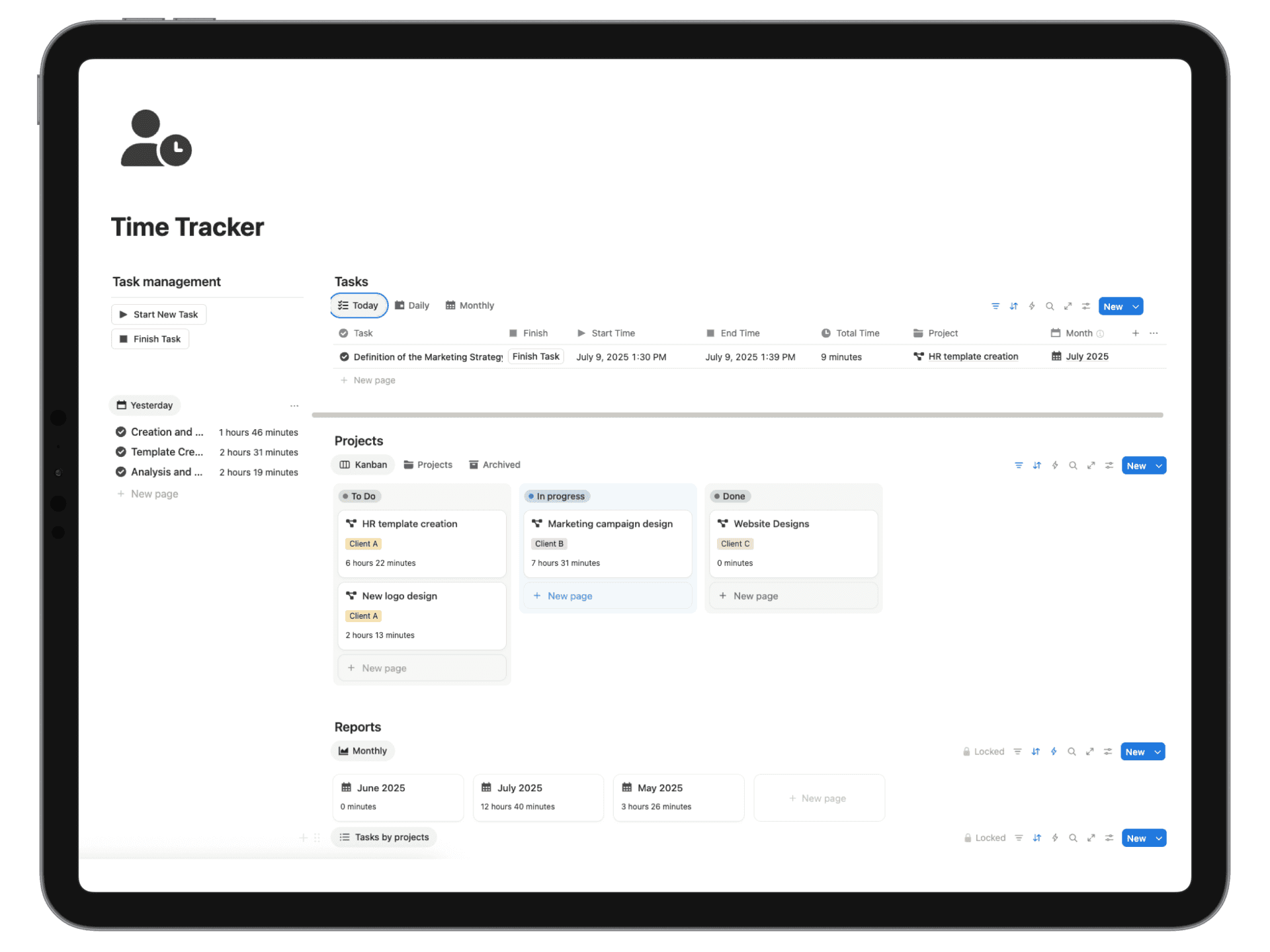
Here’s a peek at how a clean, Notion-based time tracker can look, with clear columns for tasks, projects, and hours.
This simple layout proves how organized data makes it easy to see where your time is going, which is the foundation for smart billing and business analysis.
Your Weekly Review Ritual
A time tracker’s real power isn’t just in counting the minutes—it’s in the story the data tells you. Block out just 15-30 minutes on your calendar at the end of each week for a non-negotiable "Time Review." This is a quick meeting with yourself to look at the numbers and ask some honest questions.
Your weekly time report isn't just a timesheet; it's a business intelligence document. It reveals which clients are truly profitable, where your process gets bogged down, and whether you're charging enough for your work.
During your review, hunt for patterns:
- Check Your Project Budgets: Is a project creeping up on its hour limit? This lets you flag it for the client before it becomes an issue, not after.
- Analyze Your Task Breakdown: Did those "quick revisions" actually eat up 20% of your week? Data like this gives you the confidence to set firmer boundaries or adjust your pricing next time.
- Compare Billable vs. Non-Billable Hours: How much time did you really spend on marketing, admin, or writing proposals? Seeing that number in black and white is often the push you need to find efficiencies or outsource the busywork.
By turning these simple practices into habits, your time tracker becomes more than just a clock. It grows into a trusted advisor, giving you the hard data you need to build a smarter, more profitable, and far more sustainable freelance business.
How to Choose the Right Time Tracking App for You
<iframe width="100%" style="aspect-ratio: 16 / 9;" src="https://www.youtube.com/embed/kq0m9O9RFt0" frameborder="0" allow="autoplay; encrypted-media" allowfullscreen></iframe>With so many options out there, picking the right time tracking app can feel like a huge, permanent decision. But it doesn't have to be so intimidating. The best way to think about it is like hiring an assistant—you need someone (or something) that gets your workflow, supports your goals, and actually makes your life easier.
It's easy to get sidetracked by flashy features you'll never touch. Instead, zoom in on what your freelance business truly needs. A few pointed questions can help you cut through the noise and find a tool that feels like it was made just for you. This isn't just about downloading an app; it's about building a system you can rely on.
Start With Your Non-Negotiables
Before you even glance at pricing or brand names, get really honest about your core needs. What problem are you trying to solve right now? Running through a quick checklist can keep you from picking a tool that’s either way too simple or ridiculously over-engineered for what you do.
Here are the essential questions every freelancer should ask themselves:
- What’s my main goal here? Am I just trying to create more accurate invoices? Do I need to figure out which projects are actually profitable? Or am I trying to build better habits and stop procrastinating? Your primary objective points you toward the features that matter.
- How complex are my projects? Do I juggle multiple tasks for different clients within the same project, or is a simple client-level timer good enough for now?
- Do I need this on my phone? If you’re often working away from your desk or need to log time for client calls on the fly, a solid mobile app is a must-have, not a nice-to-have.
- What kind of reports do I need? Are you just tracking hours for your own sanity, or do you need to send clients slick, professional reports to back up your invoices?
Answering these first will give you a clear picture of your ideal tool, making the rest of the process a whole lot smoother. You can find some great comparisons of the top 5 time tracking apps for freelancers that can help you measure different options against your list of needs.
Consider Your Budget and Scalability
Of course, cost is a factor. But it’s not just about the monthly subscription fee—it’s about value. A free tool might look great at first, but if it costs you two hours a month in manual admin work, a paid plan that automates that task offers a much better return.
Interestingly, one survey found that 78% of freelancers prefer free tools because they're simple and can scale as needed. The lesson here is clear: don't pay for features you don't use, especially when you're just starting.
Think about where your business will be a year from now. The best time tracking app is one that can grow with you.
Will you eventually need to manage a small team, connect to your accounting software, or track project expenses? Choosing a tool with a clear upgrade path means you won’t have to go through this whole search again when your business hits its next growth spurt. The needs of consultants can be especially specific, a topic we dive into in our guide to the best time tracking software for consultants.
Use Free Trials to Your Advantage
Almost every reputable time tracking app offers a free trial or a freemium plan. This is your chance to take your top choices for a real test drive. Don't just click around the dashboard—pick a real project and track your time with the app for at least a full week.
This simple decision tree shows a common fork in the road for freelancers choosing a tool.
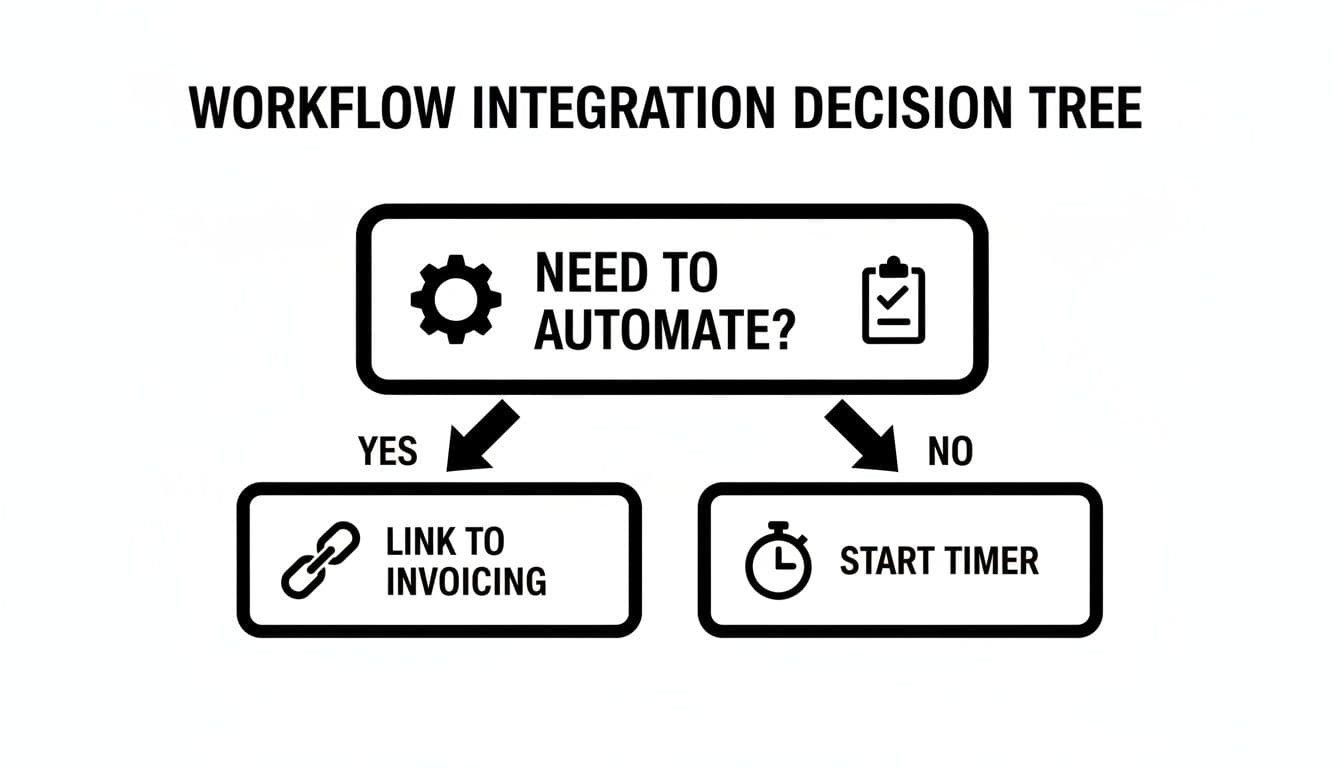
As you can see, whether or not you need automation—like linking directly to invoicing software—is a key question that separates different types of tools and workflows.
During your trial, pay attention to the little things that make a big difference. Is the interface intuitive, or do you have to hunt for the "start timer" button every time? Does the mobile app sync quickly? By the end of the week, you'll have a much better feel for which tool actually fits into your daily routine instead of disrupting it.
Got Questions About Time Tracking? Let's Clear Things Up.
Jumping into time tracking can feel like adding yet another thing to your already-packed to-do list. It’s totally normal to have a few questions before you commit. Let's tackle some of the most common worries freelancers have, so you can move forward with confidence.
Think of this as the final check-in before you take off. You know why you should track your time and you've seen the options. Now, let's smooth out those last few wrinkles of doubt.
Is It Really Worth Paying for a Time Tracking App?
This is probably the first question on every freelancer's mind. With so many solid free tools out there, does it make sense to pay a monthly subscription? The answer almost always boils down to one simple concept: return on investment.
A free app is a fantastic starting point. It gets you into the habit of logging your hours, helps you see where the day goes, and lets you whip up basic invoices. But when you upgrade to a paid plan, the tool often transforms from a simple stopwatch into a genuine business partner.
Paid plans typically introduce features that directly boost your efficiency and, more importantly, your bank account:
- Deeper Analytics: Paid reports go way beyond a simple list of hours. They can show you which clients are your most profitable, pinpoint which types of tasks consistently blow past their estimates, and track your all-important billable vs. non-billable ratio over time.
- Effortless Invoicing: The magic of turning tracked hours into a professional invoice with a single click—and then syncing it to your accounting software like QuickBooks—can easily save you a few hours of admin headache every single month.
- Project Budgeting & Alerts: Many paid tools let you set a budget for a project, either in hours or dollars. You'll get an automatic heads-up when you're getting close to the limit, which is a lifesaver for managing client expectations and stopping scope creep in its tracks.
The real question isn’t, “Can I afford this app?” It’s, “Can this app help me find enough unbilled time or make one smarter business decision to pay for itself?” For most of us, capturing just one or two forgotten billable hours a month is more than enough to cover the subscription fee.
Ultimately, you're paying for automation and intelligence. If those features save you time, prevent costly mistakes, and give you the data to price your services more confidently, that monthly fee starts looking less like an expense and more like a smart investment.
How Do I Use Time Tracking on Fixed-Price Projects?
I get it—this sounds completely backward. If you’re not billing by the hour, why on earth would you track your hours? But here's the secret: tracking time on fixed-price projects is one of the most powerful business habits you can build. The focus simply shifts from external billing to internal business intelligence.
On a fixed-price project, your time log is your personal profitability report. It tells you your effective hourly rate.
Let's say you complete a $2,000 project in 20 hours. Your effective rate is a respectable $100 per hour. But what if that same project spirals into 40 hours because of "just one more little tweak"? Suddenly, your rate has been slashed to $50 per hour.
This kind of data is pure gold. It helps you:
- Quote with Confidence: The next time a similar project comes across your desk, you're not just guessing how long it will take. You can look at real, historical data and build a quote based on evidence, protecting your profit margin from day one.
- Spot Scope Creep Early: A detailed time log shows you exactly when a project starts going off the rails. It gives you hard data to bring back to the client and say, "The original scope took X hours. These new requests have added Y hours, so we should probably talk about adjusting the project fee."
- Refine Your Own Process: By looking at where your time went, you can spot inefficiencies. Maybe you're sinking too much time into initial concepts or getting stuck in endless revision cycles. This insight is crucial for making your workflow smoother and more profitable.
Tracking time on a fixed-price project isn't for the client's invoice. It's for your own future success.
Will These Apps Monitor My Screen Activity?
Privacy is a huge deal, and for good reason. Nobody wants to feel like they're being watched. It's really important to understand the massive difference between a standard time tracker and invasive employee monitoring software.
The vast majority of time tracking apps built for freelancers are designed for personal productivity and transparent billing—that's it. They work like a simple stopwatch that you control. You hit "start" when you begin a task and "stop" when you're done. They log the time and whatever description you give it.
Now, some tools do offer optional features like tracking which apps or websites you use while a timer is running. But these are almost always features you have to purposely enable. They're meant to help you reconstruct your day if you forgot to start a timer, not to spy on you.
The really invasive stuff—like random screenshots, logging your keystrokes, or accessing your webcam—is typically found in corporate surveillance software used to manage large remote teams. These are absolutely not standard features in the tools most freelancers would ever choose.
When you're picking an app, look for one that makes its privacy policy clear. A trustworthy tool will always give you 100% control over what gets recorded. The goal here is to gain insight, not to give up your privacy.
Ready to stop guessing and start knowing? The Flowtion Time Tracker Pro for Notion gives you a powerful, duplicable system to manage your projects and understand your profitability with total clarity. Get started in one click and take control of your time today.